
































Your iPad Pro is one of the most capable tablets ever made, so it deserves a case that does more than just sit there. Between creative workflows, video calls, and streaming sessions, most people need a case that pulls double duty as a stand, a screen protector, and something that actually looks good in a meeting. The problem is that bulky cases ruin the slim profile Apple worked so hard to achieve, while ultra-thin options leave your device vulnerable to drops and scratches. Finding that sweet spot between protection, functionality, and aesthetics can feel overwhelming when dozens of options flood the market every season. This guide walks you through the key factors that actually matter when selecting an iPad Pro case, helping you cut through marketing noise and make a decision you will be happy with for years.
Why Your iPad Pro Needs More Than Basic Protection
The iPad Pro represents a significant investment, and its aluminum body, while beautiful, picks up scratches and dents surprisingly fast. A single drop onto a hard surface can crack the display or bend the chassis, turning a productivity powerhouse into an expensive repair bill. But protection alone is not enough. Modern iPad Pro users treat their tablets as laptop replacements, which means they need hands-free viewing angles for typing, stable positions for video calls, and secure pencil storage for quick sketches. A case that only absorbs impact without adding functionality misses the point entirely. The best cases transform how you interact with your device every single day, turning a flat slab of glass into a versatile workstation that adapts to your environment.
Key Features That Separate Great Cases from Average Ones
Stand Functionality and Viewing Angles
A kickstand or built-in stand mechanism changes everything about how you use your iPad Pro. Instead of propping it against a stack of books or holding it at an awkward angle during a video call, a quality stand lets you position the screen exactly where you need it. Look for cases offering multiple viewing angles rather than a single fixed position. Some situations call for a nearly upright screen for FaceTime, while others need a gentle recline for reading or sketching. Magnetic stand mechanisms tend to offer smoother adjustability compared to rigid plastic kickstands, and they fold completely flat when not in use. Stability matters too. A stand that wobbles when you tap the screen defeats its own purpose, so look for designs with a wide base or strong magnetic hold that keeps the tablet steady during touch interaction.
Join The European Business Briefing
New subscribers this quarter are entered into a draw to win a Rolex Submariner. Join 40,000+ founders, investors and executives who read EBM every day.
Subscribe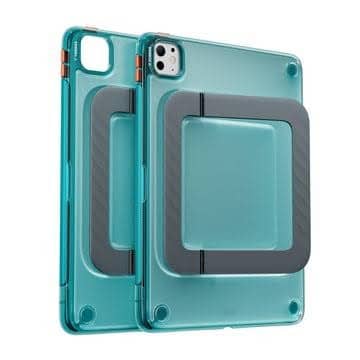
Slim Profile and Weight Considerations
Apple engineered the iPad Pro to be remarkably thin and light. Wrapping it in a chunky case that doubles its thickness and adds noticeable weight undermines that design intent. The ideal case adds minimal bulk while still providing meaningful drop protection and scratch resistance. Pay attention to exact millimeter measurements rather than vague claims of being slim. Cases under two millimeters thick at their thinnest points generally maintain the tablet’s sleek feel without compromising daily carry comfort. Material choice plays a big role here. Polycarbonate and TPU blends achieve strong impact absorption at thinner profiles compared to pure silicone, which needs more material to offer the same protection level. Hard-shell backs with flexible bumper edges often deliver the best ratio of protection to thickness.
Apple Pencil Compatibility and Storage
If you use an Apple Pencil, your case needs to accommodate it without creating friction. Many cases block the magnetic charging zone along the top edge, which means your pencil either cannot attach at all or fails to charge while connected. Dedicated pencil holders solve both the storage and charging problems simultaneously, keeping your stylus secure during transport while maintaining the wireless charging connection. Some designs use a raised lip or groove that cradles the pencil and prevents it from sliding off in a bag. Others integrate a full flap that covers and protects the pencil from external impacts. Consider how you carry your iPad. If it goes into a backpack regularly, a covered holder prevents the pencil from being knocked loose and lost.
Materials and Build Quality That Last
Case materials determine longevity, grip, and how the case ages over time. Cheaper cases made from low-grade silicone tend to stretch out, yellow, and attract lint within months. Higher-quality options use materials that maintain their shape, color, and texture through daily handling. Look for reinforced corners where impact force concentrates during drops. Cases with air-cushion pockets or raised bezels around the screen and camera provide targeted protection for the most vulnerable areas without adding bulk everywhere else. The interior lining matters too. A soft microfiber lining prevents micro-scratches on the aluminum back, while a bare hard plastic interior can create its own marks over time. Magnetic closure systems add a premium feel and keep folio-style cases securely shut, eliminating the frustration of flaps that fall open in a bag. TORRAS cases, for example, combine polycarbonate rigidity with flexible edge materials to keep the overall profile slim while still absorbing drop energy effectively across their iPad Pro lineup.
Matching Your Case to Your Daily Workflow
For Creative Professionals
Artists and designers who rely on the Apple Pencil need cases that support low-angle positions for drawing and do not interfere with palm rejection along the screen edges. A case with a smooth, non-textured front surface avoids snagging the pencil tip during long strokes. Weight distribution also matters during extended drawing sessions since a back-heavy case creates wrist fatigue when holding the tablet in landscape. Cases with stand modes that allow nearly flat angles give you a slight tilt for more natural drawing ergonomics without the tablet sliding away on smooth surfaces.
For Business and Productivity Users
People who use their iPad Pro for documents, email, and presentations benefit most from cases with stable upright positions and keyboard compatibility. A case that works seamlessly alongside a Bluetooth keyboard effectively turns your tablet into a laptop replacement for travel. Look for designs that do not block any ports or speaker grilles, ensuring full audio quality during meetings and presentations. Professional environments also demand understated aesthetics. Matte finishes resist fingerprints better than glossy options, and neutral colors like black, navy, or gray transition smoothly from the office to a client lunch without drawing unnecessary attention to themselves.
For Students and Everyday Users
Students toss their tablets into crowded backpacks daily, so drop protection and corner reinforcement take priority. A case with a secure pencil holder prevents the stylus from vanishing into the depths of a bag. Lightweight designs help when you are already carrying textbooks and a laptop alongside your tablet. Budget matters for students, but investing in a quality case costs less than a single screen repair. Multi-angle stands support both note-taking in class and media consumption during downtime, making versality a worthwhile feature rather than a luxury for this group.
Common Mistakes When Buying an iPad Pro Case
The most frequent error is prioritizing looks over function. A gorgeous leather folio means nothing if it adds so much weight that you leave the iPad at home. Similarly, people often buy cases designed for older iPad models assuming they will fit newer versions, only to discover misaligned camera cutouts and blocked buttons. Always verify exact model compatibility before purchasing. Another mistake is ignoring how the case affects wireless charging for the Apple Pencil. Some cases with thick top edges or metal components interfere with the magnetic connection, resulting in a pencil that appears attached but never actually charges. Testing this immediately after purchase saves frustration later. Finally, many buyers overlook ventilation. Cases that completely seal the back panel can trap heat during intensive tasks like video editing or gaming, potentially triggering thermal throttling that slows performance. Designs with subtle ventilation channels or thinner material in high-heat zones keep your iPad Pro running at full speed when it matters most. TORRAS addresses several of these concerns in their Ostand series by engineering precise cutouts and slim-profile builds that maintain full device functionality without compromising the streamlined form factor.
Finding Your Perfect iPad Pro Companion
Choosing an iPad Pro case ultimately comes down to understanding your own habits. Think about where you use your tablet most, how you carry it, and which tasks fill your screen time. A creative professional has fundamentally different needs than a business traveler, and a student faces challenges neither of those groups encounter. Prioritize the features that align with your actual daily routine rather than chasing every possible specification. Start with non-negotiables like model compatibility and pencil charging support, then layer in preferences for stand angles, materials, and aesthetics. The right case should feel invisible when you want portability and indispensable when you need functionality. Take your time, check compatibility twice, and invest in quality that matches the device it protects.