





























Images rarely stay where they were born. A photo made for one purpose drifts into another, a logo once necessary becomes visual clutter, an old scan suddenly needs new life. Modern image work is less about heavy editing and more about making clear decisions—what to keep, what to remove, and how to do it without leaving traces of the process behind.
A Platform Built for Real Image Work
Join The European Business Briefing
New subscribers this quarter are entered into a draw to win a Rolex Submariner. Join 40,000+ founders, investors and executives who read EBM every day.
SubscribeMore than a single-purpose tool
AIEnhancer isn’t designed around one isolated function. It’s a collection of AI-powered image tools that can be used independently or combined when needed. Some users arrive with a single problem to solve, others stay because the platform quietly adapts to very different visual tasks without demanding a new workflow each time.
Flexibility over forced workflows
One important detail often missed is that each module stands on its own. You can remove a watermark without editing anything else. You can enhance resolution without touching the composition. Or, when it makes sense, you can chain tools together. AIEnhancer doesn’t assume how you should work, which is surprisingly rare.
Why separation matters
When tools are tightly bundled, small tasks feel heavier than they should. By keeping modules separate, AIEnhancer allows focused actions. This is especially true when dealing with sensitive edits like removing marks or restoring older images, where restraint matters more than creative freedom.
Removing Watermarks as a Focused Task
Intelligent removal without collateral damage
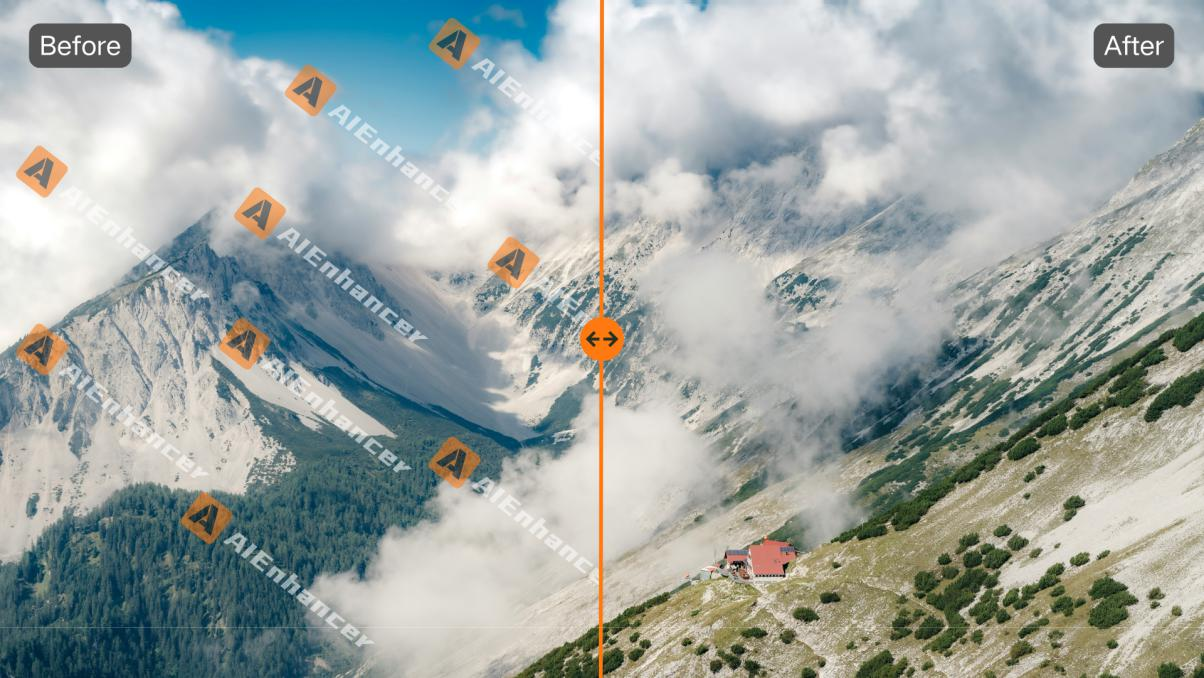
A capable watermark remover does more than delete visible symbols. AIEnhancer analyzes the surrounding context—textures, edges, lighting—and reconstructs what likely belongs underneath. The goal isn’t invisibility through blur, but continuity that feels natural to the eye.
Handling complex backgrounds
Flat colors are easy. The real challenge lies in skin tones, fabrics, foliage, and gradients. AIEnhancer’s watermark remover is trained to respect these variations, preserving detail instead of flattening it. The cleaned image retains depth, which is usually where manual edits fall apart.
When speed changes behavior
Because the watermark remover works quickly, users stop postponing cleanup. Images that once felt “almost usable” are fixed instead of ignored. Over time, this shifts habits. Visual quality improves not through perfectionism, but through lowered friction.
Editing Without Being Forced to Edit
Image editing as an optional layer
Not every cleaned image needs further changes. That’s why AIEnhancer keeps its editing tools separate. When creative control is required, it’s available. When it isn’t, nothing gets in the way. This separation keeps the watermark remover from feeling like a gateway to unnecessary complexity.
Prompt-driven creative adjustments
For users who do want to go further, the AI image editor offers a different kind of control. Instead of dense panels and sliders, it works through prompts, model selection, and output ratios. You describe intent, adjust direction, and review results. It feels more like guiding than manipulating.
Independence without isolation
Although the AI image editor and watermark remover are separate modules, they complement each other naturally. You might clean an image today and edit it weeks later, or never. The tools don’t assume sequence, which makes them easier to trust.
Other Tools That Quietly Do the Heavy Lifting
Enhancing resolution and clarity
Low-resolution images remain a common bottleneck, especially with older assets. AIEnhancer’s image enhancement tools focus on increasing sharpness, restoring detail, and improving color balance without introducing artificial-looking artifacts. It’s less about dramatic transformation, more about making images usable again.
Restoring old and damaged photos
Old photos come with their own problems: fading, scratches, uneven tones. AIEnhancer’s restoration capabilities aim to stabilize these images, not rewrite them. When combined thoughtfully with a watermark remover, even scanned or archived images can be cleaned without losing their original character.
Smart compression without visible loss
Image size still matters for web performance. AIEnhancer’s compression tools reduce file size while preserving perceived quality. This becomes especially useful after using a watermark remover, ensuring that cleaned images don’t become heavier assets.
Practical Use Across Different Contexts
Content and marketing workflows
For marketers and content creators, the watermark remover often becomes the entry point. Old visuals are refreshed, reused, and aligned with current branding. Over time, AIEnhancer functions less like a toolset and more like an image utility layer that supports daily publishing.
Small teams, limited resources
Teams without dedicated designers benefit most from modular tools. The watermark remover handles cleanup, enhancement tools improve quality, and editing remains optional. No single task forces a full redesign or a steep learning curve.
Personal and archival projects
Outside of commercial use, people turn to AIEnhancer for personal reasons. Family photos, scanned documents, and inherited images—all benefit from careful cleanup. Using a watermark remover in this context is about respect and preservation, not speed alone.
Responsible Use and Realistic Expectations
Knowing when to stop
AI can predict patterns, but it doesn’t understand sentiment. Sometimes an imperfection belongs to the image. AIEnhancer’s watermark remover works best when users treat it as a precise instrument, not a blunt solution applied everywhere.
Rights and intent still matter
Removing watermarks should align with legitimate use. AIEnhancer positions its watermark remover as a tool for images you have the right to reuse or restore. This ethical boundary is part of what keeps the platform credible.
Long-term value through restraint
What makes AIEnhancer sustainable isn’t any single feature, but how its tools stay out of the way. The watermark remover doesn’t demand edits. The editor doesn’t demand creativity. Each tool exists to solve a specific problem and then step back.
Clarity as the End Goal
Cleaner images, clearer messages
When distractions disappear, images communicate more directly. A reliable watermark remover supports that clarity without drawing attention to itself. The image feels finished, not fixed.
A modular future for image tools
AIEnhancer’s approach suggests a future where tools adapt to tasks, not the other way around. Independent modules, used alone or together, give users control over how much intervention an image really needs.
Quiet improvements that add up
In practice, the most valuable tools are the ones you stop noticing. AIEnhancer’s watermark remover, alongside its enhancement and editing modules, fits into workflows without ceremony. The result isn’t flashier images—it’s images that simply work, again and again.