































Buying and selling NFTs might seem complicated at first, but it becomes much easier once you understand the steps and use trusted marketplaces.
Read on to learn how to purchase NFTs on Polygon using the popular NFT marketplace, Magic Eden.
What Are Polygon NFTs?
Polygon NFTs are digital assets, such as artwork, music, in-game items, or collectibles, created and hosted on the Polygon blockchain, a Layer 2 scaling solution built on top of Ethereum. These NFTs are minted on the Polygon network instead of Ethereum but function in the same way as Ethereum-based NFTs.
Join The European Business Briefing
New subscribers this quarter are entered into a draw to win a Rolex Submariner. Join 40,000+ founders, investors and executives who read EBM every day.
SubscribeThey follow the same standards: ERC-721 or ERC-1155 tokens. Several NFT platforms, including the ME marketplace, have integrated with Polygon to offer users a cost-effective and efficient experience.
How to Buy Polygon NFTs, Step by Step
 Follow this complete step-by-step to begin collecting NFTs on the Magic Eden marketplace with ease.
Set Up a Compatible Wallet
Start by installing a wallet that supports the Polygon network, such as MetaMask, Magic Eden Wallet (the platform’s own multi-chain wallet), Phantom, or others.
Fund Your Wallet
Once your wallet is set up, the next step is to fund it with cryptocurrency supported by your chosen platform, in this case, POL.
POL is the native token of the Polygon network, used for covering transaction fees and purchasing NFTs. You can buy POL on various cryptocurrency exchanges.
Connect Your Wallet to Magic Eden
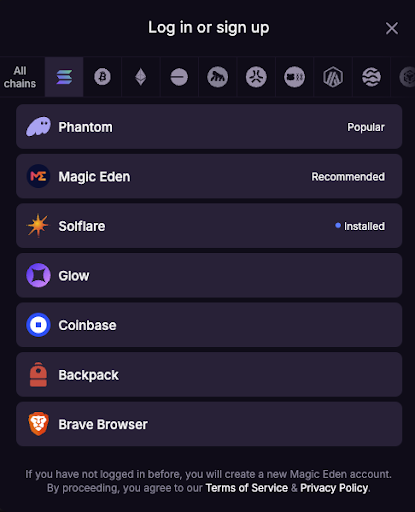
Go to the Magic Eden marketplace and click “Log In” in the top-right corner. You can register via email or by connecting your chosen wallet directly to the marketplace.
If you’re signing up with an email address, enter a valid email where a confirmation code will be sent. Once you enter the code, your registration will be complete, and you’ll be able to connect your wallet.
An easier option is to simply link the wallet right away. Choose your wallet from the list and connect it to the marketplace.
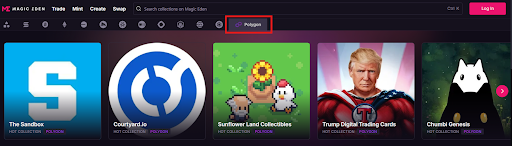
 Make sure you’re on the Polygon network by scrolling through the blockchain icons to the left until you find and select Polygon.
Browse and Select Your Polygon NFT
At this stage, you’ll have thousands of NFTs to explore. Thankfully, Magic Eden provides plenty of filters, by category, collection, price, and more, to help narrow down your options.
Head to the marketplace Polygon section, browse the available collections, or search for a specific NFT.
Confirm and Complete the Purchase
 There are two ways to purchase NFTs on Magic Eden. You can buy a single NFT instantly or select and purchase multiple items at once.
Single NFT purchase
Review the item and its price. Hover over the NFT and click “Buy.”
A “Complete Order” window will pop up on the right.
Confirm the transaction and pay attention to the gas fee.
Make sure to verify and approve the purchase in your connected wallet. Once confirmed, you will see a notification that the transaction is pending review. Once it’s processed, a pop-up will confirm that it’s complete.
Multiple NFT purchases
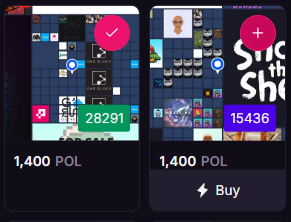 On the collection page, select multiple NFTs by clicking the plus icon in the top-right corner of each item.
Click the “Buy using POL” button. You’ll also have the option to view your cart before proceeding.Check and confirm the transaction in your wallet, taking note of the transaction fee.Wait for a notification about the pending transaction and its confirmation status.
Approve the purchase in your wallet’s pop-up window. Once the process is complete, you’ll receive a confirmation message.
Congratulations, you now own NFTs on the Polygon blockchain!