


























Many AI video prompts sound impressive but give the model very little to do. Words such as “cinematic,” “dramatic,” and “high energy” describe a mood, but not what should move or how the camera should behave. The result may look polished while still feeling random.
A stronger prompt begins with motion. With Grok Imagine, creators can start from text, an image, or existing footage and guide movement through plain-language instructions. Verbs turn a visual idea into an action: a camera pushes toward a subject, clouds drift, a character turns, fabric ripples, or light sweeps across a product.
The best prompt makes movement easy to picture before generation begins.
Join The European Business Briefing
New subscribers this quarter are entered into a draw to win a Rolex Submariner. Join 40,000+ founders, investors and executives who read EBM every day.
SubscribeMood Words Describe the Result, Not the Action
“Cinematic product video with dramatic lighting” communicates a general look, but it leaves several questions unanswered. Does the product stay still? Does the camera orbit, push forward, or slide sideways? Should the background move? Should the light change gradually?
Compare that vague direction with a more specific prompt:
A glass perfume bottle stands on black stone. The camera slowly pushes toward the label while a narrow beam of light sweeps across the glass and mist drifts behind it.
The second prompt still creates a cinematic mood, but it builds that mood through visible actions. Each movement has a subject, direction, and pace. It is also easier to revise. If the camera is distracting, “pushes toward” can become “holds on.” If the background is too active, the drifting mist can be reduced or removed.
Build Motion in Clear Layers
A video prompt becomes more useful when movement is separated into layers. The subject, environment, camera, timing, and fixed elements do not need equal detail, but each should have a clear role.
- Give the Subject One Main Action
Start with the person, product, animal, vehicle, or object carrying the scene. Use a verb that describes one readable action: turns, lifts, opens, steps, pours, smiles, unfolds, accelerates, or settles.
Avoid forcing several unrelated actions into a short clip. “She turns, walks forward, waves, looks back, and begins dancing” asks too much of one moment. A narrower instruction is easier to understand:
She turns toward the window and gives a small, natural smile.
The simple action gives the camera and environment a clear event to support.
- Let the Environment Add Secondary Motion
Environmental movement adds depth without making the main subject perform everything. Curtains sway, leaves tremble, steam rises, rain falls, reflections shift, or traffic passes in the distance.
Secondary movement should not distract from the product or hide a subtle expression. A useful prompt establishes priority:
The model remains still while her hair moves lightly in the wind and distant fabric panels sway slowly.
These modifiers keep the environment from taking over the shot.
- Direct the Camera With a Specific Verb
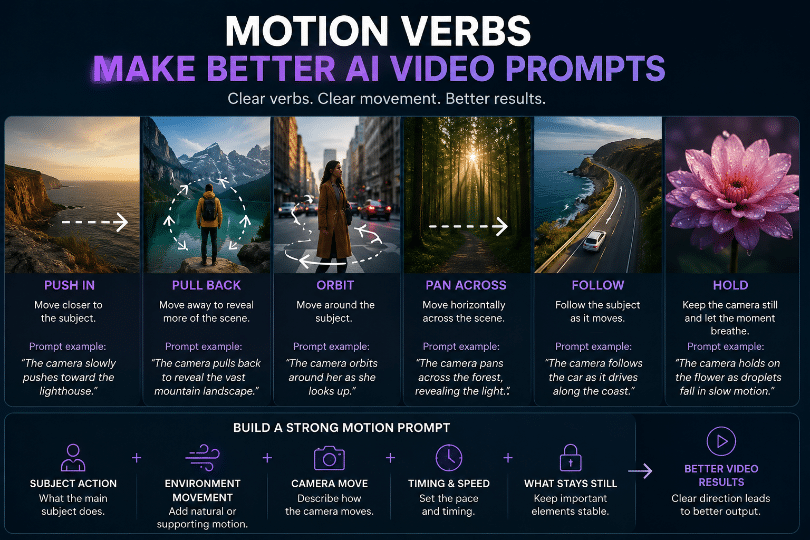
Camera verbs create different relationships between the viewer and the subject. Push, pull back, orbit, track, hold, and reveal are not interchangeable.
A push draws attention inward, a pullback reveals context, and an orbit emphasizes shape and space. A held frame lets the action inside the composition lead.
Choose one main camera action unless the shot genuinely needs a transition. “Orbit, zoom, tilt, and whip pan” is usually less useful than:
The camera makes a slow quarter-orbit around the shoe, keeping the logo centered.
The instruction defines the move, speed, distance, and visual priority.
- Add Speed and Timing
The same verb creates different results depending on pace. A character may turn sharply, gradually, hesitantly, or in one smooth movement. A camera may push slowly, glide steadily, or rush forward.
Timing words shape the effect. “Gradually” builds anticipation, “quickly” creates impact, and “gently” suits restrained lifestyle footage.
Sequence words also clarify order:
The camera holds on the closed box, then slowly pulls back as the lid opens.
The prompt describes not only what happens, but when it happens.
- State What Should Stay Still
One overlooked prompt technique is naming the visual anchor. If every element moves, the clip may become unstable or difficult to read.
Keep the bottle fixed and upright while the camera slides from left to right and reflections move across the surface.
For portraits, the face may need to remain stable while hair and clothing move. For ads, the label may need to stay readable while the camera changes position. For illustrations, the original composition may need to remain intact while selected elements animate.
Motion works best when it has something stable to move against.
Match the Verb to the Visual Goal
Different verbs solve different creative problems. “Reveal” introduces information, “follow” suits movement through space, “hold” gives a detail time to register, and “settle” creates a natural ending.
Choose verbs for communication, not decoration. A fast orbit may show the shape of a car, but it may be a poor choice when the audience needs to read a small badge. A slow push may strengthen a portrait but make an energetic sports clip feel flat.
Before writing the prompt, finish this sentence:
The movement should help the viewer notice ______.
The answer usually points toward the right verb.
Improve Prompts by Revising One Motion at a Time
When a result is close but not right, do not replace the entire prompt immediately. Change the motion instruction causing the problem.
If the subject looks unnatural, simplify the subject action. If the clip feels chaotic, reduce environmental movement. If the composition loses focus, replace an orbit with a push or locked frame. If the ending feels abrupt, add that the motion gradually settles.
This approach works well with Grok Video because users can begin with a prompt or uploaded image, describe the movement, generate a version, and refine the direction. The prompt becomes a set of adjustable decisions rather than one block of decorative language.
A simple revision log might compare:
- a slow orbit around the product;
- a locked product frame with moving reflections;
- a gentle push toward the label.
Each version tests one camera behavior, so the differences are easier to judge.
Use Adjectives After the Motion Is Clear
Adjectives such as “soft,” “playful,” or “luxurious” can guide a scene, but they should not replace action.
A practical prompt order is:
- Identify the subject and setting.
- Describe the subject’s main action.
- Add environmental movement.
- Specify the camera move.
- Define speed, timing, and anything that must remain stable.
- Add visual style and mood.
For example:
A ceramic coffee cup sits beside an open notebook in morning light. Steam rises in thin curls while one page lifts slightly in the breeze. The camera slowly slides closer from the side, keeping the cup in sharp focus. Warm, quiet, natural lifestyle look.
The mood is present, but visible actions support it.
Better Verbs Lead to Better Creative Decisions
Motion verbs do more than improve prompt wording. They force creators to decide what a short video should show. They separate subject movement from environmental movement and make camera direction easier to review.
Before generating the next clip, remove any adjective that does not change the visible action. Then check whether the prompt names who moves, what moves, how fast it moves, and what stays still. A few precise verbs usually provide more direction than a paragraph of cinematic language.
Start with one subject action, one supporting movement, and one camera verb. Generate the clip, observe what each motion contributes, and refine only the part that needs to change. That is how a prompt becomes less like a mood board and more like a usable plan for video.