





























Let’s get one thing out of the way immediately: the release of GPT Image 2 didn’t just iterate on the artificial intelligence image generation space; it completely reset the baseline expectations for the entire industry. We are no longer living in the era where you have to cross your fingers and hope the AI doesn’t give your subject six fingers or morph the background into a surreal, abstract nightmare. With photorealistic outputs, genuinely impressive instruction-following capabilities, and native image editing—specifically inpainting and outpainting—that feels like absolute magic, this model has rapidly become the undisputed gold standard for developers, technical SEO specialists, product managers, and digital artists alike.
But here is the catch that many fail to realize: OpenAI built the underlying engine, but they aren’t the only ones selling the car. Over the past year, an entire ecosystem of wrappers, API gateways, all-in-one creative workspaces like DramaPixel, and serverless deployment platforms has sprung up around GPT Image 2. Every single one of these platforms claims to offer the absolute “best” experience, but under the hood, they cater to wildly different workflows, technical proficiencies, and corporate budgets.
If you are coordinating with a technical development team to implement backend and frontend features for web applications, your infrastructure needs are going to look entirely different from a social media manager making mobile collateral, or a machine learning engineer trying to optimize inference latency. You don’t just need an image generator; you need the right operational infrastructure to support your specific daily tasks. In this uncompromising deep-dive, we are tearing down the eight leading platforms offering GPT Image 2 access right now. We are going to look past the marketing fluff and analyze their pricing architectures, their developer experience (DX), their user interfaces (UI), and the real-world use cases they actually excel at.
Join The European Business Briefing
New subscribers this quarter are entered into a draw to win a Rolex Submariner. Join 40,000+ founders, investors and executives who read EBM every day.
SubscribeTL;DR — Quick Comparison Table
| Platform | Starting Price | API Access | Best For | Free Tier |
| APIPASS | ~$0.012 / image | ✅ Yes | Developers, API power users, strict cost efficiency | ✅ Yes (trial credits) |
| Higgsfield AI | ~0.5 – 12 credits / image | ✅ Yes | Creative professionals, high-resolution quality focus | ✅ Limited |
| fal.ai | Pay-per-use | ✅ Yes | Developers, lightning-fast inference, prototyping | ✅ Trial credits |
| OpenRouter | Pay-per-token / image | ✅ Yes | Multi-model API routing, omnichannel developers | ❌ No |
| PicsArt | 4 credits / image | ❌ No | Casual creatives, app-based social media content | ✅ Free plan |
| Replicate | Pay-per-run (compute time) | ✅ Yes | ML engineers, scalable custom model deployment | ✅ Trial credits |
| WaveSpeed AI | Top-up based | ✅ Yes | Speed-focused bulk generation, high-volume users | ✅ Limited |
| GPTImage2.ai | Subscription / credit-based | ❌ No | Absolute beginners, zero-knowledge non-technical users | ✅ Free tier |
Website List
1. APIPASS — The Developer’s Unrivaled Cost-Efficiency Engine
If you are building an AI-driven web platform, managing a technical team, or scaling a software-as-a-service (SaaS) product, you already know the pain points. Managing multiple API keys, navigating convoluted billing dashboards, and dealing with unexpected rate limits is a massive operational headache. APIPASS was built specifically to eliminate that friction entirely. It functions as a unified AI API marketplace and gateway, giving you direct, developer-grade access not just to GPT Image 2, but to a massive roster of cutting-edge models through a single, streamlined endpoint.
The Architecture and Experience
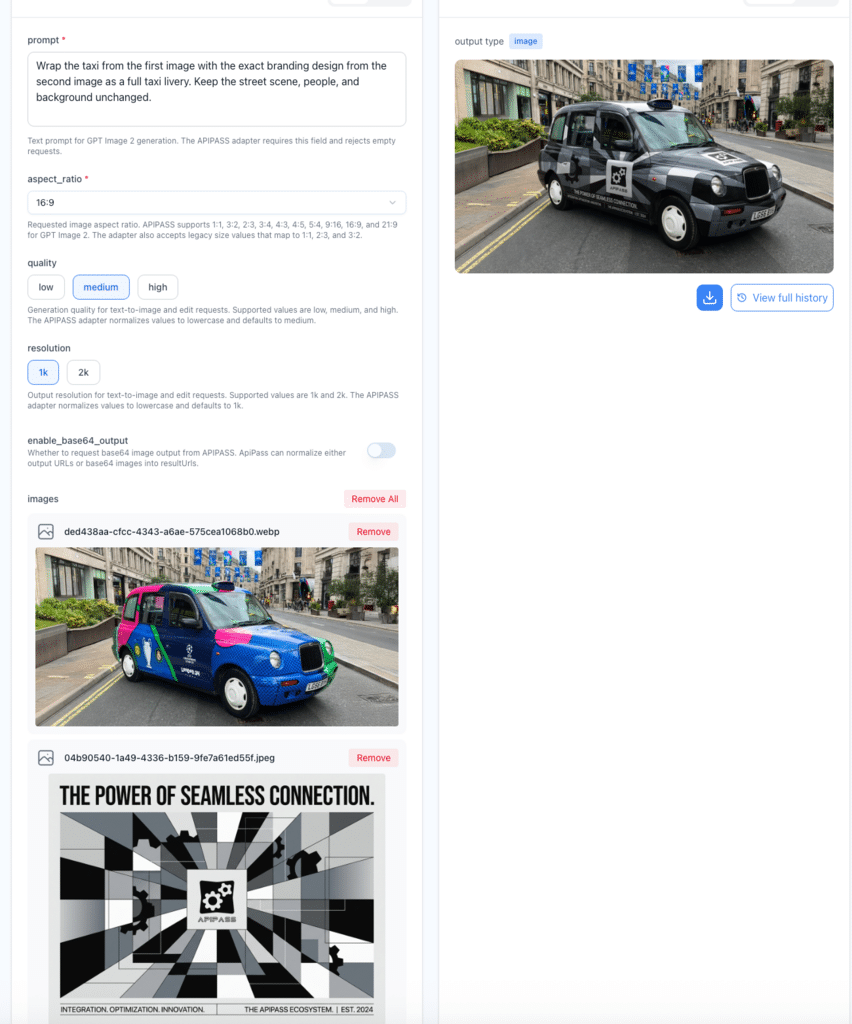
APIPASS is heavily optimized for a clean, minimalist developer experience. Since its major feature expansion throughout early 2026, it has solidified itself as a premier destination for routing. You won’t find a bloated visual canvas or a clunky front-end interface here. Instead, you get a highly transparent dashboard, rock-solid server uptime, and a straightforward integration process. What makes APIPASS truly stand out is how it exposes the full, unadulterated feature set of GPT Image 2. You aren’t just getting basic text-to-image prompting; you get full programmatic access to the model’s capability to edit image with AI.
Furthermore, it offers a tiered quality system built directly into the API calls, alongside strict dimensional controls. If you need to command the generation tool to output exact pixels—forcing a length of 1465px and a width of 823px for a highly specific frontend container—APIPASS handles that dimensional payload flawlessly without unprompted cropping.
The Economic Breakdown
APIPASS shines in its absolute financial transparency. There are no opaque, gamified “credits” that hide the true cost of your compute. It passes through the underlying token and image cost with a highly competitive structure:
- Low Quality: ~$0.012 per image
- Medium Quality: ~$0.042 per image
- High Quality: ~$0.167 per image
You pay exactly for what you use, down to the decimal. There is no mandatory monthly subscription required, meaning you aren’t bleeding your budget during developmental downtime.
The Good and the Bad
- Pros: The pricing is as granular and transparent as it gets in the industry. You get the complete GPT Image 2 toolset. The single API endpoint for multiple models radically simplifies backend architecture.
- Cons: If you don’t know how to write a basic cURL request or read a JSON response, this platform is completely useless to you. There is no built-in creative interface for visual editing.
The Final Verdict
APIPASS is the definitive choice for startups, SaaS builders, and technical project managers. If you are coordinating backend and frontend feature implementation and need a reliable, cost-effective engine under the hood, this is your infrastructure.
2. Higgsfield AI — The Digital Darkroom for Visual Purists
While APIPASS targets the backend developers writing the code, Higgsfield AI is looking squarely at the art directors, professional photographers, and UI/UX designers who demand visual perfection. If you care deeply about outputting clean, minimalist, and flat-design aesthetics for professional branding or high-fidelity UI mockups, Higgsfield provides the intricate tooling necessary to bend GPT Image 2 to your exact will.
The Architecture and Experience
Higgsfield has built a beautiful, creative-first interface that feels significantly more like professional desktop software than a standard web wrapper. The integration of GPT Image 2 here is entirely focused on output fidelity. Users have access to a granular quality selector and, crucially, resolution tiers that push the model to output 1K, 2K, and even stunning 4K images natively.
For a design professional, the prompt history and saved generations feature is an absolute lifesaver. You can iterate on a specific visual concept, saving the exact seed numbers and parameter combinations that worked, and discard the rest. If you are designing assets for retro pixel games featuring isometric perspectives and high-precision pixel models, the ability to lock in specific stylistic parameters across multiple generation runs is invaluable. This platform understands that prompting is an iterative, highly controlled process, not a one-shot gamble.
The Economic Breakdown
Higgsfield utilizes a proprietary credit system rather than direct dollar billing. The cost of generating an image operates on a sliding scale based on the exact combination of quality and resolution you request at the time of generation:
- Minimum (low quality / 1K): 0.5 credits per image.
- Standard commercial combinations: 1 to 4 credits per image.
- Maximum quality (Ultra-high fidelity / 4K): Up to 12 credits per image.
While credit packs are available for ad-hoc purchase, heavy users will strongly want to look at their subscription tiers, which significantly discount the per-credit conversion rate.
The Good and the Bad
- Pros: Unmatched manual control over resolution and visual quality. The UI is an absolute joy to use for visual thinkers. The 4K upscaling is natively integrated into the workflow.
- Cons: Those 4K, maximum-quality generations eat through your credit balance alarmingly fast. The credit abstraction makes it slightly harder to calculate exact dollar costs per image.
The Final Verdict
If you are generating assets for a high-end corporate landing page, clean branding materials, or detailed textures, Higgsfield is worth the premium pricing. It is built for the user who values the final pixel perfection over the raw speed of generation.
3. fal.ai — The Speed Demon for Real-Time Prototyping
In the high-stakes world of machine learning infrastructure, latency is the ultimate enemy. If you are building a consumer-facing application—say, an interactive chat agent that generates contextual images on the fly based on user inputs—a five-second delay can completely destroy the user experience. Enter fal.ai, a platform built from the ground up to squeeze every conceivable ounce of speed out of AI inference.
The Architecture and Experience
fal.ai offers direct, programmatic access to GPT Image 2 via a highly optimized, serverless architecture. You do not have to worry about provisioning your own GPUs, managing cold starts, or configuring load balancers; fal.ai handles the underlying plumbing flawlessly. They provide incredibly clean REST APIs alongside robust software development kits (SDKs) for Python and JavaScript, making integration a breeze for modern web development stacks.
One of their most compelling features is the in-browser model playground. Developers can test their JSON payloads and prompt variables right in the browser, witnessing the blazing response times firsthand before writing a single line of production code. Furthermore, for heavier, more complex tasks, their comprehensive webhook support allows for seamless asynchronous generation workflows.
The Economic Breakdown
This is a pure pay-as-you-go, usage-based model. You are billed per image generation run, with pricing that closely mirrors OpenAI’s base API costs, plus a microscopic margin for the delivery of their ultra-fast infrastructure. They are quite generous with free trial credits for new sign-ups, and if you are pushing massive commercial volume, their enterprise account executives are known to negotiate substantial volume discounts to keep your operating costs manageable.
The Good and the Bad
- Pros: Industry-leading, face-melting inference speeds. The API documentation is pristine and highly actionable. Serverless deployment means zero infrastructure anxiety for your engineering team.
- Cons: This is a hardcore developer tool. There is absolutely no consumer-friendly interface for your marketing team to use. Because pricing is tied tightly to compute execution, highly complex pipelines might lead to unpredictable costs.
The Final Verdict
fal.ai is the absolute weapon of choice for ML engineers, backend developers, and product teams building real-time applications. If your core product metric is “Time to First Byte” (TTFB) for visual asset delivery, fal.ai will comfortably beat the competition.
4. OpenRouter — The Omnichannel Gateway for AI Generalists
The artificial intelligence landscape is brutally fragmented. One day you need a language model for parsing technical documentation, the next day you need a multimodal model for video analysis, and today you need GPT Image 2 for asset generation. Managing API keys, billing cycles, and rate limits across half a dozen different corporate vendors is an administrative nightmare. OpenRouter solves this by acting as a universal translator and routing engine.
The Architecture and Experience
OpenRouter gives you a single API endpoint. You format your request, specify which exact model you want to hit, and OpenRouter acts as the highly efficient intermediary. The absolute genius of this platform is that its API format is intentionally OpenAI-compatible out of the box. If you have an existing codebase built around OpenAI’s native SDK, you literally just change the base URL string and drop in your OpenRouter key.
This platform is uniquely suited for complex, omnichannel content strategies. For instance, if you are coordinating content where you rewrite a new article entirely in target languages like German, Japanese, and Korean rather than directly translating a Chinese article, you can use OpenRouter to seamlessly hit a localized LLM and subsequently trigger GPT Image 2 to generate culturally relevant, localized imagery through the exact same API dashboard.
The Economic Breakdown
OpenRouter prides itself on radical transparency. There are no hidden markup fees disguised as arbitrary subscriptions. You pay the exact per-image or per-token cost dictated by the underlying model provider. You simply top up your account balance, and it drains linearly based on your exact, measured usage.
The Good and the Bad
- Pros: One API key rules them all. Zero vendor lock-in. Effortless migration for existing codebases. Beautifully transparent cost tracking. Excellent server uptime and failover capabilities.
- Cons: Like other API gateways, there is no graphical user interface (GUI) for non-developers to generate art manually. It lacks highly specialized, image-specific workflow tools.
The Final Verdict
OpenRouter is the perfect middle ground for agile development teams and solo developers who are building hybrid AI applications. If you need a unified billing roof for your entire AI tech stack, this is the premier routing platform available today.
5. PicsArt — The Mainstream Goliath for Social Creatives
Let’s pivot entirely away from the command line for a moment. What if you don’t know what a JSON payload is, and you honestly don’t care to learn? What if you are a marketing manager trying to pump out high-converting Pinterest pins, TikTok thumbnails, and Instagram carousels while on your morning commute? That is where PicsArt flexes its massive, consumer-friendly muscles.
The Architecture and Experience
PicsArt is already an established behemoth in the mobile and web creative space, boasting hundreds of millions of active global users. By integrating GPT Image 2 directly into their existing creative suite, they have successfully democratized access to enterprise-grade AI generation. The workflow here is intensely visual and wildly intuitive. You type in a prompt, the AI spits out an image, and you are immediately dropped into a comprehensive ecosystem of editing tools.
Need to strip the background from the generated image? It takes one tap. Want to overlay bold, modern typography for a marketing campaign? Done. Need to slap a trendy color-grading filter over the AI-generated subject and export it in a perfect 9:16 aspect ratio for a story post? It takes three seconds. PicsArt surrounds the raw power of GPT Image 2 with thousands of templates, stickers, and a thriving social community where you can share your edits and remix other people’s work seamlessly.
The Economic Breakdown
PicsArt operates heavily on a consumer-friendly, gamified credit system.
- Generating a single image via the GPT Image 2 model costs a flat rate of 4 credits.
- Free-tier users receive a limited drip of credits every month to experiment with.
- Power users are heavily nudged toward the PicsArt Plus premium subscription, which unlocks a massive monthly credit allowance alongside all of their gated premium editing tools, fonts, and stock assets.
The Good and the Bad
- Pros: The learning curve is virtually non-existent. The mobile application is arguably the best in the entire industry for on-the-go generation. The post-generation editing tools (text formatting, filters, collages) are incredibly robust and user-friendly.
- Cons: There is no API access whatsoever. The 4-credit-per-image cost can drain your account incredibly fast if you are doing a lot of trial-and-error prompting to get the perfect shot. You also have very little control over the raw, technical generation parameters.
The Final Verdict
This is the undeniable champion for social media managers, solo entrepreneurs, and casual hobbyists. If you need a polished, ready-to-post piece of visual marketing collateral in under five minutes, all from your smartphone, PicsArt is the tool you download immediately.
6. Replicate — The Machine Learning Engineer’s Sandbox
Replicate occupies a fascinating, highly technical space in the AI ecosystem. It is part model registry, part deployment platform, and part hardcore developer community. For machine learning engineers who want to tinker with the underlying mechanics of artificial intelligence rather than just blindly sending text prompts into the void, Replicate offers an environment built strictly for scale, control, and experimentation.
The Architecture and Experience
When you use GPT Image 2 on Replicate, you are interacting with it in a highly structured, containerized environment. Replicate makes it incredibly easy to pull the model via API using Python, Node.js, or simple command-line tools. But where it really shines is in its broader ecosystem. If you are working on complex data pipelines—say, using a vision model to analyze a user’s uploaded photo, passing that data to a language model to write a highly descriptive prompt, and then finally pushing that prompt into GPT Image 2—Replicate provides the robust infrastructure to string these disparate models together smoothly.
They offer an excellent in-browser playground for testing parameters, but the platform is inherently built for async generation at a massive, enterprise scale. Furthermore, Replicate heavily versions its models. If a platform update unexpectedly changes how a model interprets a specific style prompt, you can pin your API calls to a specific, older version of the container to ensure your live application doesn’t break in production.
The Economic Breakdown
Unlike platforms that charge a flat fee per image or per token, Replicate charges based on raw compute time (a strict pay-per-run model). You are paying precisely for the milliseconds that their Nvidia GPUs spend processing your specific request. While this is incredibly fair, it means that complex, high-resolution generations will objectively cost more than quick, low-res thumbnails.
The Good and the Bad
- Pros: Deeply trusted by the enterprise developer community. Unmatched version control for model deployments. Excellent webhook infrastructure for heavy, asynchronous workloads. You only pay for exact compute time used.
- Cons: Because it dynamically spins up containers, you can occasionally hit “cold start” latency issues if you are on a lower-tier usage plan, meaning your first generation might take a few extra seconds to initialize.
The Final Verdict
Replicate is built strictly for technical teams running custom AI pipelines, data scientists, and ML engineers who demand absolute, uncompromising control over their deployment environments and need rock-solid versioning for production applications.
7. WaveSpeed AI — The Industrial-Scale Image Factory
Sometimes, image generation is about careful artistic expression. Other times, it is purely about overwhelming volume. If you are managing an e-commerce catalog with 50,000 SKUs, you don’t need a digital darkroom. You need a factory. WaveSpeed AI positions itself as the high-throughput, industrial-scale solution.
The Architecture and Experience
WaveSpeed AI has aggressively stripped away the friction of complex ML deployments and hyper-detailed creative canvases to focus entirely on two things: generation speed and batch processing. The platform provides a relatively straightforward user interface for quick prompting, but its real, undeniable power lies in its API and its bulk-generation tools.
They have optimized their backend infrastructure specifically to handle massive concurrent requests. This is remarkably useful for aggressive web deployment tactics. For instance, if you are executing a bridge page SEO strategy for live programmatic stock pages, your architectural goals are highly specific. You need to prevent Google’s crawlers from crawling these directories without doing 404 or 403 operations because the pages are already online. Meanwhile, you still need to populate those bridge pages with rich, instantly generated contextual media to satisfy the human users who land there. WaveSpeed’s high-throughput API allows you to script the generation of thousands of these graphical assets simultaneously, seamlessly integrating into your programmatic frontend without triggering server timeouts.
The Economic Breakdown
WaveSpeed AI intelligently eschews the traditional, restrictive monthly SaaS subscription in favor of a highly flexible top-up model. You buy bundles of credits based strictly on your immediate project needs. This is brilliant for agencies or businesses that have highly cyclical workloads. If you need to generate massive batches of images for a website launch this month, but need almost zero next month, you aren’t bleeding subscription fees during your downtime.
The Good and the Bad
- Pros: Incredible throughput capabilities designed for scale. Handles massive batch generation with ease. The top-up credit model is financially forgiving for project-based work.
- Cons: The user interface is functional but decidedly unpolished. Advanced fine-tuning and intricate editing features take a backseat to raw generation speed.
The Final Verdict
This is the ultimate tool for growth marketers, programmatic SEO specialists, e-commerce brand managers, and anyone whose core business model relies on generating a massive quantity of visual assets quickly and reliably.
8. GPTImage2.ai — The Minimalist’s Frictionless Launchpad
Every major technology curve needs a gateway tool. For the millions of people who hear about the wonders of artificial intelligence in the news but get immediately overwhelmed the second they see the words “API Key,” “Compute Latency,” or “JSON payload,” GPTImage2.ai serves as the ultimate friction-free entry point. It does exactly one thing, and it does it as simply as humanly possible.
The Architecture and Experience
GPTImage2.ai is a hyper-focused, single-model platform. You navigate to the website URL, you see a clean text box, you type what you want to see, and you get an image. That is the entire pitch. The interface is meticulously stripped down, actively removing any confusing sliders, node-based workflows, or dense parameter settings that might intimidate a newcomer.
To help combat the “blank canvas paralysis” that many absolute beginners face, the platform features a robust, highly visual gallery of prompt suggestions and examples. You can click on a beautiful image generated by someone else, see exactly what text they typed to achieve it, and tweak a few words to make it your own. The site is highly responsive, working just as well on a mobile device browser as a desktop computer.
The Economic Breakdown
They offer a hybrid pricing approach specifically designed to capture the casual market.
- There is a highly accessible free tier that grants a handful of generations per month, which is absolutely perfect for occasional, light use.
- For users who want to play around more frequently, they offer both low-cost monthly subscriptions and simple a-la-carte credit top-ups without any long-term commitments.
The Good and the Bad
- Pros: It is literally impossible to get confused using this platform. The onboarding process is entirely frictionless. The free tier is fantastic for pure experimentation without having to pull out a credit card.
- Cons: It is a completely closed ecosystem. There is zero API access. You cannot manipulate advanced settings, dictate seed numbers, or utilize complex inpainting workflows.
The Final Verdict
This platform is ideal for your non-technical colleagues, absolute beginners, and anyone who just wants to see what all the hype surrounding GPT Image 2 is about without committing to a steep learning curve or a hefty enterprise subscription.
The Strategic Decision: How to Choose Your Tech Stack
Choosing between these eight diverse platforms shouldn’t be based on which homepage looks the sleekest or which has the best marketing copy; it should be a calculated operational decision based on your specific daily bottlenecks. Let’s break down the decision-making framework into three critical vectors.
- The “Build vs. Buy” API Dilemma
If you are integrating AI directly into your own proprietary software, you have to choose your infrastructure carefully.
- If you want absolute financial transparency and a unified gateway for multiple models, go directly with APIPASS or OpenRouter.
- If your software is consumer-facing and requires instant visual feedback to maintain user retention, fal.ai is your necessary infrastructure.
- If you are building complex backend workflows that require heavy asynchronous processing and custom container environments, Replicate remains the industry standard.
- The Workflow and UI Imperative
If you do not know how to code, API gateways are completely useless to you. Your decision rests entirely on your day-to-day visual workflow.
- If you are a professional designer who needs to generate base layers that will eventually end up in a massive UI mockup, you need the high-resolution, uncompressed outputs that Higgsfield AI specializes in.
- If your entire job lives on a smartphone and your output destination is social media, PicsArt gives you the AI generation plus the necessary layout tools in one single application.
- If you just want to generate a quick concept without overthinking it, use GPTImage2.ai.
- The Scaling Equation
Cost predictability is often the hardest part of managing new AI workflows. Monthly subscriptions are great if you use the tool every single day. But if your usage is heavily spiky—say, you only need bulk images when you launch a new large-scale web project—you should absolutely avoid SaaS subscriptions. Look instead to the flexible top-up models of WaveSpeed AI or the pure usage-based API billing of platforms like APIPASS.
We are operating in a remarkably mature ecosystem compared to even a year ago. The friction of adopting high-end AI generation has dropped to near zero, while the ceiling for visual quality has skyrocketed. Do your homework, utilize the free trial credits that almost all of these platforms generously offer, and test their capabilities against your specific, real-world parameters before committing your budget. The AI landscape moves violently fast, but right now, these eight platforms represent the absolute cutting edge of visual generation technology.