Introduction
AI image-to-video generators make it easier than ever to transform static pictures into engaging video content. Whether you are a YouTuber, social media creator, digital artist, educator, or marketer, these tools can help bring photos, illustrations, and product images to life without requiring advanced animation skills. Depending on the platform, you can create cinematic camera movements, animate characters, add subtle environmental motion, or develop imaginative visual effects.
1. MagicLight.AI — Best for AI Storytelling and Video Creation
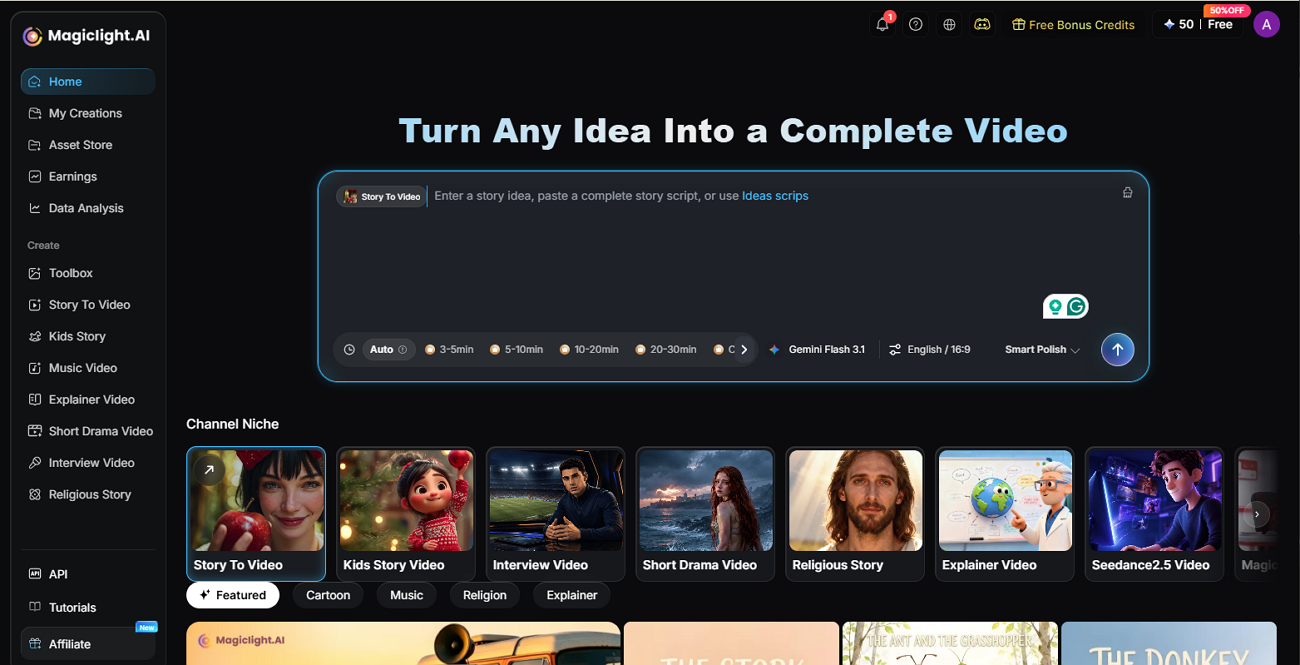
MagicLight.AI is a versatile AI video creation platform for creators who want to move beyond simple image animation. Alongside image-to-video generation, it offers tools for developing characters, planning scenes, creating storyboards, and producing narrative-driven videos. This makes it especially useful for creators who want to turn illustrations, visual concepts, or story ideas into more complete video projects.
Join The European Business Briefing
New subscribers this quarter are entered into a draw to win a Rolex Submariner. Join 40,000+ founders, investors and executives who read EBM every day.
SubscribeKey Features
- AI image-to-video generation: Turn still images into moving video clips using image prompts.
- AI character creation: Create visual characters for animated stories and other video projects.
- Story to Video: Transform scripts or stories into structured videos with multiple scenes.
- Storyboard editing: Organize scenes and make adjustments before generating the final video.
- Multiple visual styles: Explore different artistic approaches for storytelling and creative content.
- MagicLight Agent: Develop an idea through a conversational workflow that helps with scripts, storyboards, characters, and production planning.
Pros
- Supports both image-based creation and broader storytelling workflows.
- Offers tools for character creation and scene planning.
- MagicLight Agent helps simplify the production process.
- Suitable for creators who want to develop complete videos rather than isolated clips.
Limitations
Some advanced video features may require credits or a paid plan. Free image or character generation does not necessarily mean unlimited free video generation, so check the current plan details before starting a large project.
Best for: Storytellers, educators, animation creators, and content creators who want to turn visual ideas into structured videos.
2. Runway — Best for Creative Control
Runway is an AI creative platform with video-generation and editing tools. Its image-to-video capabilities allow creators to use an existing image as the starting point for an animated scene. The platform is useful when you want to experiment with camera movement, atmosphere, and subject motion while retaining the general composition of your original image.
Key Features
- Image-to-video generation.
- Text prompts for guiding movement.
- A broader collection of AI video and image tools.
- Creative workflows for short clips and visual experiments.
The quality of the result depends on the source image, the selected model, and the instructions you provide. Short, specific prompts often work better than descriptions that request many complicated actions simultaneously.
Pros
- Offers a broader creative toolkit.
- Suitable for experimenting with different visual movements.
- Useful for artistic and cinematic concepts.
Limitations
Runway’s free plan has limited credits, and its official plan information states that free-plan videos include a watermark. Free access is therefore better suited to testing than to producing large volumes of finished content.
Best for: Creators who want to experiment with AI video generation and creative visual effects.
3. Canva — Best for Social Media Content
Canva is a practical option for creators who want to animate images and incorporate them into finished designs. Its AI image-to-video functionality can help transform still images into short clips, while its design editor makes it easy to add text, branding, and other visual elements.
Key Features
- AI-powered image-to-video generation.
- A beginner-friendly design interface.
- Templates for social media and marketing.
- Tools for adding text, logos, and other design elements.
- A workflow that combines video creation with graphic design.
Rather than focusing exclusively on video generation, Canva makes it convenient to turn generated visuals into publishable content.
Pros
- Easy to use for beginners.
- Convenient for social media graphics and promotional videos.
- Combines animation and design tools in one workspace.
Limitations
AI usage allowances and access to particular features may vary by plan. Check the current terms if you need frequent generations or specific export options.
Best for: Social media managers, marketers, small businesses, and creators who want to combine animated images with graphic design.
4. Pika — Best for Creative and Stylized Animations
Pika is an AI video-generation platform suited to creators who want to experiment with imaginative visual effects and short animated clips. Rather than focusing only on realistic movement, creators can use supported features to explore stylized transformations, playful animations, and attention-grabbing visuals.
Key Features
- Image-to-video generation.
- Text prompts for describing movement.
- Creative video effects and transformations.
- Short-form video creation for digital content.
As with other AI video generators, results vary according to the image and prompt. If you want to preserve a character’s appearance, describe the desired movement clearly and avoid requesting unnecessary changes to the subject.
Pros
- Suitable for experimental visual content.
- Offers creative approaches to short video generation.
- Useful for digital art and social media projects.
Limitations
Free access and available credits can change. Check the current pricing page for generation limits, commercial-use conditions, and export restrictions before relying on it for ongoing production.
Best for: Digital artists, social media creators, and users interested in stylized animations and creative effects.
5. Kling AI — Best for Cinematic-Looking Motion
Kling AI is another option for creators who want to transform still images into video scenes with natural-looking subject movement and camera motion. It can be useful for animating portraits, landscapes, illustrations, and other images when you want the result to feel more like a moving scene than a simple slideshow.
Key Features
- Image-to-video generation.
- Text prompts for guiding scene movement.
- Options for creative and cinematic-style video experiments.
- Potential uses in visual storytelling and short-form content.
To improve the results, start with a clear image and focus on one main action. Complicated instructions can sometimes produce unexpected changes to the subject or background.
Pros
- Worth exploring for cinematic-style image animation.
- Supports image-based video creation.
- Useful for creative concepts and visual storytelling.
Limitations
Free credits, model availability, and generation limits may vary by account and region. Review the official website to confirm what is currently available to free users.
Best for: Creators who want to experiment with cinematic-looking movement and AI-generated visual scenes.
How to Choose the Best Free AI Image-to-Video Generator
Choosing the right tool depends on your goals, workflow, and budget. Consider these factors before committing to a platform.
1. Define Your Content Goals
If you only need a short animation for a social media post, a dedicated image-to-video generator may be sufficient. If you want to create a longer story with multiple scenes, characters, and narration, consider a platform with broader video-production capabilities.
2. Compare Free Credits and Limits
A free plan may provide a limited number of credits rather than unlimited generations. Check whether credits refresh, how much each generation costs, and whether the plan restricts video length or resolution.
3. Evaluate Animation Quality
Test your own images instead of relying entirely on promotional examples. Look for smooth motion, consistent details, natural camera movement, and minimal distortion.
4. Check Export Options
Consider the resolution, aspect ratio, clip duration, and watermark policy. Vertical video may be important for short-form platforms, while landscape video may be more suitable for conventional YouTube content.
5. Review Commercial-Use Terms
If you create content for clients or monetize your videos, confirm the applicable usage rights. Your rights may depend on the platform, subscription plan, and source material.
Tips for Creating Better AI Image-to-Video Results
You can often improve the results by using a clear source image and giving the AI specific instructions.
- Choose a high-quality image: Clear subjects and well-defined compositions provide a stronger starting point.
- Describe movement precisely: Explain what should move and how quickly.
- Avoid overly complicated prompts: Start with one primary action and add subtle background movement if needed.
- Preserve important details: Ask the AI to keep the subject’s appearance, clothing, and composition consistent.
- Experiment with variations: Small changes to the prompt can produce different results.
- Match the output to your platform: Choose the appropriate aspect ratio for your intended destination.
Conclusion
The best free AI image-to-video generator depends on what you want to create. MagicLight.AI is a strong option for creators who want to combine image animation with storytelling and structured video production. Runway is worth considering for creative control, Canva is convenient for social media designs, Pika supports experimental visual effects, and Kling AI offers another option for cinematic-looking motion.
Frequently Asked Questions
1. What is the best free AI image-to-video generator in 2026?
The best option depends on your needs. MagicLight.AI is worth considering for storytelling workflows, Canva for design-focused content, Runway for broader creative tools, Pika for experimental effects, and Kling AI for cinematic-style image animation.
2. Can I turn a picture into a video for free?
Yes. Several platforms offer free access or limited credits for image-to-video generation. The number of generations, available features, and export conditions vary by platform.
3. Which tool is best for social media videos?
Canva is convenient when you want to combine animated images with text, templates, and branding. Dedicated video generators may be preferable if your priority is more elaborate motion or visual effects.
4. Can AI animate a photo without changing the face?
AI can attempt to preserve facial features, but results are not guaranteed. Use a clear image, request subtle movements, and explicitly ask the model to keep the person’s appearance consistent.
5. Are free AI image-to-video generators watermark-free?
Not all of them. Watermark policies vary by platform and plan. Check the current export terms before generating content for public or commercial use.