































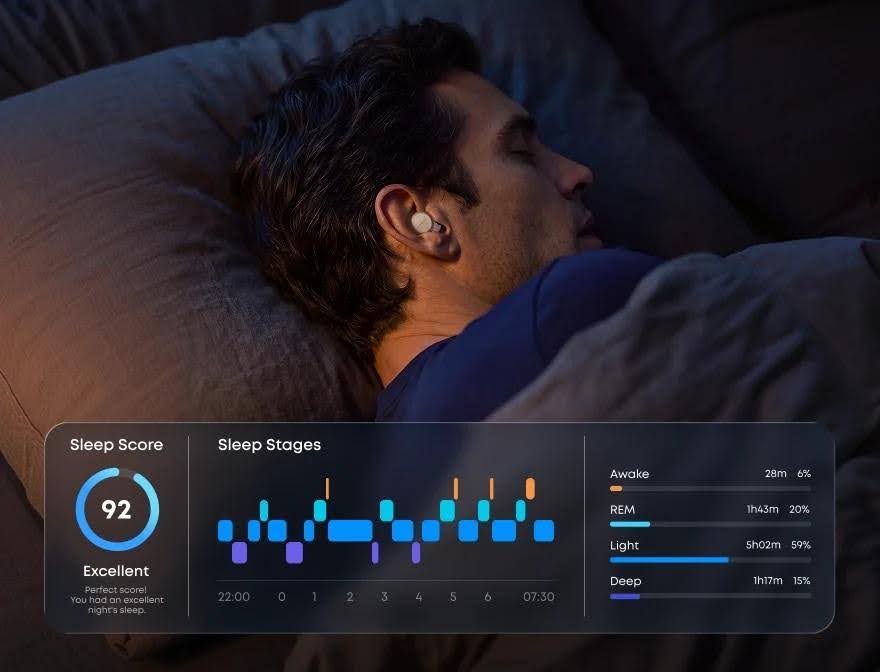
At a Glance
- Category difference: Everyday earbuds are for daytime use. Sleep earbuds focus on overnight fit, quieter nights, and sleep audio. Sleep tracking earbuds add overnight signals and morning trends you can act on.
- Form-factor compare: Regular sleep earbuds, tracking earbuds, and rings or watches cover different jobs around side sleep, in-ear signals, all-day wear, audio, phone use, and reports.
- Before you buy: Check fit, battery, case role, PNC/ANC mix, report fields, privacy, returns, and non-diagnosis limits.
- Two paths: Choose Anker soundcore Sleep Earbuds 4 Pro for bedtime audio and in-ear PPG sleep insights in one routine. Choose Sleep A30 or Sleep A30 Special when triple noise reduction is the priority, with sleep monitoring and reports included. Keep a ring or watch if it already provides the daytime scores you want.
If you want quieter nights and a clearer view of what changed while you slept, start by separating three product jobs. Everyday wireless buds are built for daytime audio and calls. Regular sleep earbuds shift to overnight fit, quieter bedrooms, and soothing sleep audio. Sleep tracking earbuds keep that sleep-first base, then collect sleep-related signals and organize them into readable morning trends.
From there, this article covers what those sensors and reports usually include, how tracking earbuds compare with rings and watches, what to check before buying, and how Anker soundcore Sleep Earbuds 4 Pro or a triple-noise-reduction-focused pair such as Sleep A30 / Sleep A30 Special can fit a nighttime routine, including what consumer sleep data cannot prove.
Join The European Business Briefing
New subscribers this quarter are entered into a draw to win a Rolex Submariner. Join 40,000+ founders, investors and executives who read EBM every day.
SubscribeNote: This content is for informational purposes only and is not intended as medical advice. Individual results may vary. If you experience chronic sleep issues, consult a healthcare professional.
What sleep tracking adds to a sleep earbuds
Everyday earbuds are tuned for commute audio, calls, and daytime wear. Purpose-built sleep earbuds prioritize overnight comfort, bedroom noise control, and sleep-friendly sound. Sleep tracking earbuds keep that sleep-first design, then add a second job: gathering overnight signals and turning them into reports you can use.
Think of the upgrade as three layers, not one flashy score. Collection gathers movement, pulse-related signals, or other sleep-linked data while you rest. Reporting turns that stream into stages, duration, noise context, or other morning fields. Insight is the practical step after the chart: one small change worth testing next night.
You may want that stack if audio alone never explains why some nights feel lighter. You may skip it if masking or isolation already works, and you will not act on morning data. Tracking helps most when it supports a next-night decision, not when it only records the past night.
What sleep tracking earbuds measure and how the data is used
Consumer sleep monitoring earbuds do not share one sensor mix. Before you trust a chart, match each signal to the question it can answer, and notice what is measured directly versus what software estimates.
| Signal or input | What it can help answer | Direct measure or estimate |
| PPG (photoplethysmography) | Pulse-related changes through the night | Direct: optical reading of blood-flow changes at the ear |
| Heart rate and HRV (heart-rate variability) | How your pulse and beat-to-beat rhythm shifted overnight | Derived: calculated from PPG or related pulse data |
| Movement / body motion | Restlessness, position changes, and wake-like motion | Mixed: motion is sensed directly; sleep-stage-style labels are estimated |
| Breathing-related patterns | Whether breathing looks steadier or more disrupted across nights | Estimate: inferred from related signals, not a clinic-grade airway study |
| Environmental noise | How loud or irregular the bedroom sounded | Direct: mic or case capture of noise context, depending on design |
Those rows help only when last night feeds one clear choice for tonight. Before lights out, lock in tip fit, volume, and the masking or tracking modes you will leave on. Then let the buds run. Ear shape, seal quality, rolling onto your side, firmware, and app sync all affect signal quality, so treat a shaky-fit night as a setup problem before you blame the chart.
How to read a morning report without overreacting
Ignore the urge to react to every field. Name one plain-language pattern, such as later bedtimes after late scrolling, more wake moments on noisy nights, or lighter rest after alcohol. Prefer the same signal across several mornings over one dramatic score from travel, stress, late caffeine, or a tip that never seated well.
Change only one variable the next evening: bedtime, volume, tip size, or phone distance from the pillow. Compare the report with how rested you feel. Consumer sleep charts can guide a bedtime routine; they do not diagnose sleep apnea or another sleep disorder. [Source: NHLBI, nhlbi.nih.gov, Sleep Apnea]
For more on how soundcore sleep reports present quality, snoring context, and app analysis, see the sleep tracking guide.
How tracking earbuds compare with regular sleep earbuds, rings, and watches
Compare each form factor by the overnight job you care about. The table shows typical coverage by need. It does not rank accuracy.
| Need | Regular sleep earbuds | Sleep tracking earbuds | Ring or watch |
| Low profile and side sleep | Built for pillow contact and overnight in-ear wear | Aims at a sleep-first shell; confirm side-sleep pressure with sensors onboard | Avoids in-ear pressure; comfort depends on band or ring fit |
| In-ear overnight signals | Usually limited to light sleep or noise context, if anything | Can collect pulse-related and related sleep signals in the ear overnight | Uses wrist or finger sensing, not an in-ear path |
| All-day wear | Mostly a bedtime tool, not all-day sport tracking | Focus stays on the sleep window | Stronger fit for 24-hour activity and recovery views |
| Audio intervention | Masking, stories, and calm sound are core | Sleep audio and monitoring sit in one bedtime tool | Little or no personal in-ear sleep audio |
| Phone dependence | App setup and full features are common; local playback varies | Some smart-case designs can cut bedside phone use after setup | Full report sync still often needs the companion app |
| Report ecosystem | Basic sleep or noise reports on some models | Sleep-night trends tied to the same buds you wear to bed | Broader day-and-night dashboards in the wearable app |
Pick the tool that matches the job. Regular sleep earbuds fit when quieter overnight audio is enough. Rings and watches suit all-day wearers who can keep sleep audio separate. Tracking earbuds suit people who want in-ear audio and overnight signals in one bedtime device. None of these consumer tools replaces a sleep study.
What to check before buying sleep monitoring earbuds
Use this checklist once you decide monitoring belongs in your bedtime kit:
- Side-sleep fit and pressure: Low-profile shape, soft contact, and enough tip or wing sizes for each ear.
- All-night battery in real modes: Confirm playtime with the noise and audio settings you will leave on.
- Charging case role: Charge only, or also status, local data, and bedside controls.
- PNC and ANC mix: Passive seal (PNC) for higher-frequency edges; ANC for steadier low rumble; clear limits on sudden peaks.
- Volume and night controls: Easy volume limits, personal alarms, and adjustments that do not need constant phone taps.
- Report fields you care about: Duration, stages, heart-rate-related metrics, snore or noise context, and insight prompts.
- Privacy and storage path: What stays on device or case, what syncs to an app, and whether upload is optional.
- Returns and support: Tip replacements, cleaning guidance, and a return window long enough for overnight testing.
- Non-diagnosis boundary: Skip marketing that promises clinical accuracy, apnea diagnosis, or guaranteed better sleep.
Skip unverified claims on sampling rate, waterproofing, offline permanence, or perfect stage detection. Buy for a routine you can repeat.
A practical example fitting tracking earbuds into a nighttime routine
Once the category frame is clear, a purpose-built pair shows how tracking can sit inside a real bedtime loop. Use the split below to match the job, not to crown a single winner.
Anker soundcore Sleep Earbuds 4 Pro for tracking nights
Anker soundcore Sleep Earbuds 4 Pro fits when bedtime audio and morning insight need to live in the same routine. Before lights out, set fit and volume, then run a phone-free sleep routine from the AMOLED touchscreen case so audio, alarms, and morning reports stay off a bright phone on the pillow. Through the night, precise in-ear PPG sensors track heart rate, HRV, sleep stages, and nightly behaviors, while noise reduction engineered for sleep helps soften nighttime noise and a layered design supports comfortable wear, including for side sleepers. In the morning, use the detailed sleep report and personalized insights to change one habit. If you use the BioSync™ engine, treat it as a lab feature that syncs with your heart rate and adapts soothing sounds for wind-down; it is experimental and not a medical-grade intervention. Performance may vary, and the feature may be updated or removed in the future.
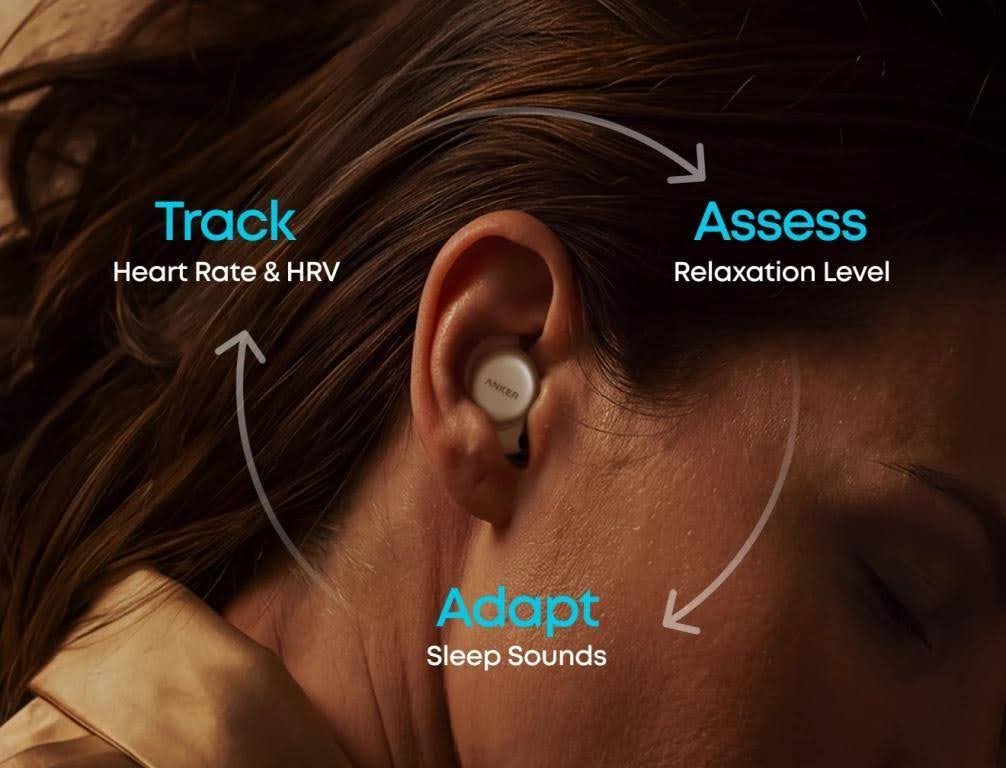
Sleep A30 / Sleep A30 Special for triple noise reduction
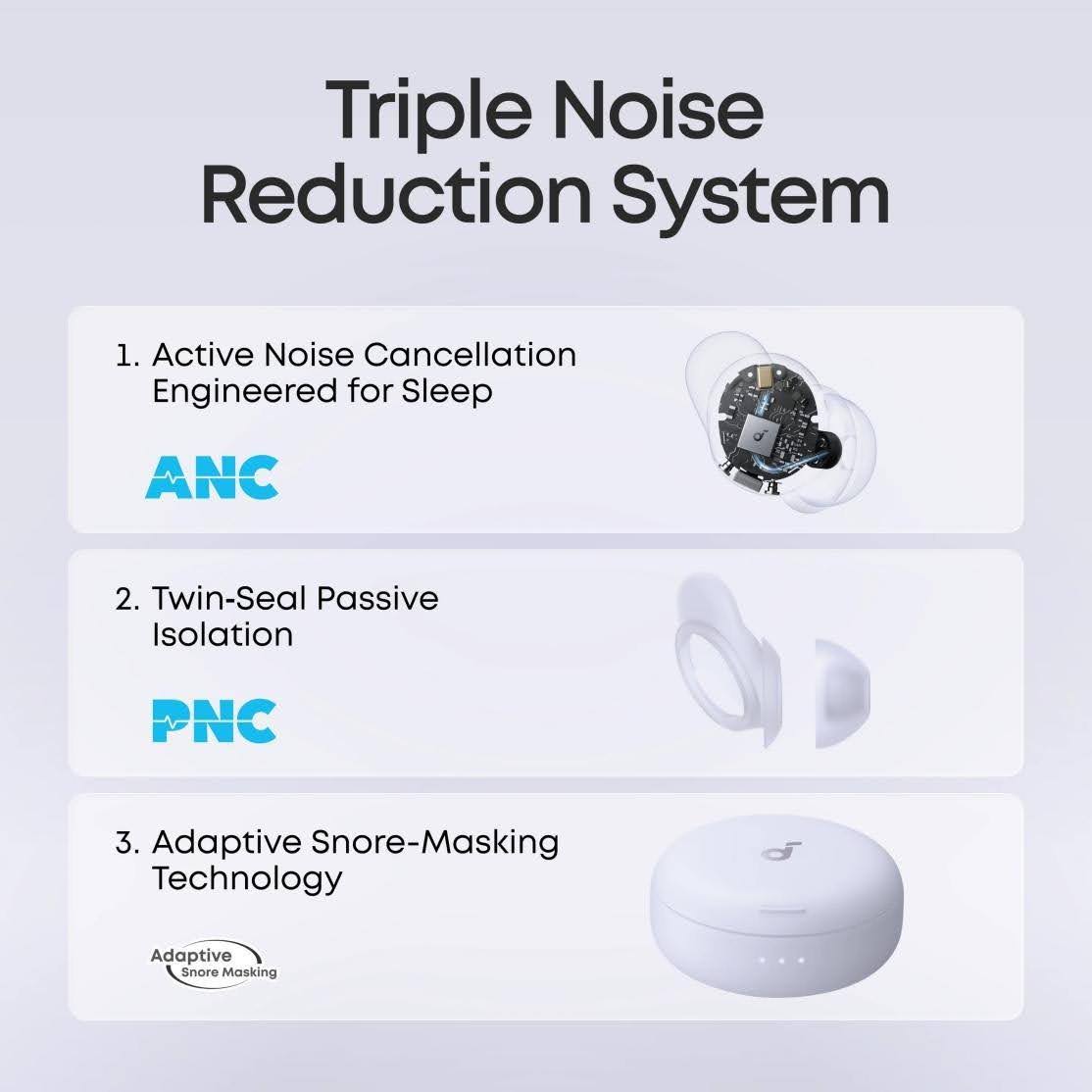
If reducing bedroom noise is your priority, Sleep A30 / Sleep A30 Special combines sleep-focused ANC, passive isolation, and adaptive snore masking in a triple noise reduction system. Its ergonomic fit is designed for comfortable overnight wear, including for side sleepers.
It also monitors sleep duration, sleeping position, and snoring, then provides a sleep report to help you review your habits. Choose Sleep A30 / Sleep A30 Special when you want calming audio and triple noise reduction first, with practical sleep insights included.
Conclusion
Judge sleep earbuds with sleep tracking by four questions: what they measure, what the report shows, whether that helps tomorrow night, and what consumer data cannot prove. Regular sleep earbuds still win on comfort and noise control alone. Tracking models earn a place when audio and overnight insight belong in the same routine.
Use the checklist above, match the form factor to how you sleep, and leave medical concerns with a clinician. From there, browse sleep earbuds to explore the broader lineup, or learn more about the Sleep Earbuds 4 Series.
Frequently Asked Questions
What do sleep tracking earbuds measure?
They measure the sleep-related inputs a given model is built to collect, not “sleep quality” as one universal value. Playback time, isolation, and a sleep score alone are not tracking. Check which morning-report fields appear and which sensors feed them, because brands label charts differently.
Are sleep tracking earbuds accurate?
Accurate enough for routine planning means the chart stays consistent with how rested you feel across similar nights. It does not certify a disorder or match a lab sleep study. If two quiet nights with the same fit look wildly different, fix setup first; if symptoms keep stacking up, see a clinician instead of chasing a higher consumer score.
Can sleep earbuds track breathing?
Some models show breathing-related trends estimated from overnight signals. That is not diagnosis or treatment of sleep apnea. Use those fields as a prompt to notice disruption, not as medical proof. Breathing pauses, gasping, or heavy daytime sleepiness belong in a clinical conversation. [Source: NHLBI, nhlbi.nih.gov, Sleep Apnea]
Are sleep tracking earbuds safe to wear overnight?
They can fit a normal bedtime kit when fit stays comfortable, volume stays moderate, and tips stay clean. Stop for pain, lasting pressure, or skin irritation, then resize or reposition before another full night. Keep a way to hear urgent alerts rather than aiming for total silence.
Do sleep tracking earbuds need a phone?
A phone is often needed for first pairing, firmware, or long-term history, but it does not have to sit on the nightstand every night. Ask what needs the app once, and what still works from the buds or case after setup. Confirm local controls, on-case reports, and data storage before you plan a phone-free routine.