





























AI video generation has crossed a threshold. What once required a production crew, a budget, and days of editing can now be done in minutes from a single text prompt. The AI video generator landscape in 2026 is rich, fast-moving, and genuinely useful — but also confusing. Platforms differ wildly in their output quality, pricing models, feature sets, and intended audiences.
This guide compares seven leading text to video and AI video generator platforms: DramaPixel, ClipTalk, Pika, Sora 2, Runway, Luma, and PixVerse. Whether you’re a solo creator, a marketing team, or a filmmaker exploring AI tools for the first time, this breakdown will help you find the right fit.
TL;DR
Here’s a quick comparison to help you decide at a glance:
Join The European Business Briefing
New subscribers this quarter are entered into a draw to win a Rolex Submariner. Join 40,000+ founders, investors and executives who read EBM every day.
Subscribe| Platform | Key Features | Pricing Model | Best For |
| DramaPixel | Text-to-video, image-to-video, start/end frame control, multiple AI models (Kling V3, Veo 3.1, Hailuo 2.3), aspect ratio control (16:9, 9:16, 1:1), duration control (5s/10s/15s) | Credit-based subscription; Lite $14.90/mo, Pro $29.90/mo, Premium $149.90/mo | Creators wanting multi-model flexibility and affordable access in one platform |
| ClipTalk | Script-to-video, AI talking characters, voice cloning, auto-captions, B-roll generation, social media formats | Minute-based; Free (1 min), Starter $19/mo, Pro $60/mo | Faceless YouTube, TikTok & social media content at scale |
| Pika | Creative text-to-video, Pikaswaps, Pikaffects, Pikaframes (start/end frames), Pikaformance (lip-sync) | Credit-based; Free, Standard $8/mo, Pro $28/mo, Fancy $76/mo | Social-first creators who want fun, stylized, viral-ready clips |
| Sora 2 | Photoreal video with synchronized audio/dialogue, physics-accurate motion, image-to-video | Bundled with ChatGPT Plus ($20/mo) or Pro ($200/mo) | Premium users already in the OpenAI ecosystem who need cinematic realism |
| Runway | Gen-4.5 video, Motion Brush, camera control, lip sync, custom voices, professional editing tools | Credit-based; Free (125 credits), Standard $12/mo, Pro $28/mo, Unlimited $76/mo | Professional filmmakers, agencies, and production studios |
| Luma | Dream Machine, Ray3 reasoning video model, HDR output, natural motion, fast generation | Generation-based; Free (30/mo), Lite $9.99/mo, Standard $29.99/mo, Plus $64.99/mo, Pro $99.99/mo | Creators prioritizing cinematic fluid motion and rapid iteration |
| PixVerse | Stylized and realistic video from text/image, anime/cinematic/clay styles, fast rendering | Credit-based; Free (daily credits), Standard $8/mo, Pro $24/mo, Premium $48/mo | Budget-conscious creators who want stylized, distinctive social content |
Website List
DramaPixel
What Is DramaPixel?
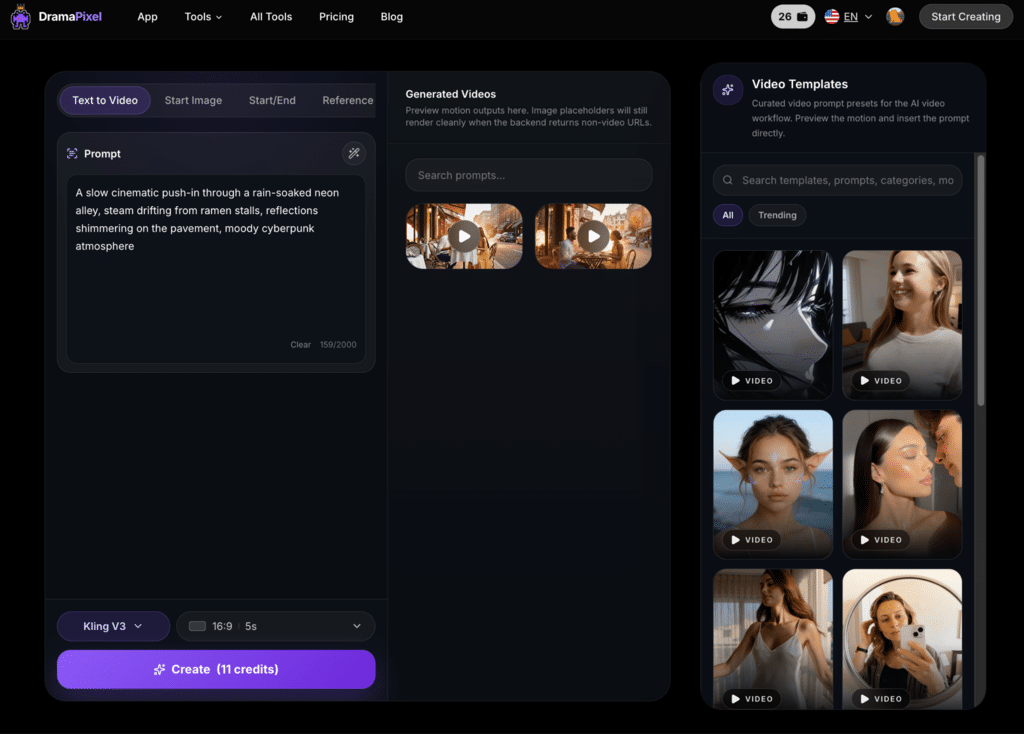
DramaPixel (dramapixel.ai) is an AI multimedia creation platform that brings together multiple state-of-the-art video generation models under a single, affordable subscription. Unlike single-model platforms, DramaPixel lets users choose between models including Kling V3, Veo 3.1 Lite/Fast/Quality, and Hailuo 2.3, all from one dashboard. It supports text-to-video, start image, and start/end frame (keyframe) generation modes, giving creators meaningful control over their output.
Features
- Multiple AI models in one place: Access Kling V3 (fast, reliable, flexible motion control), three Veo 3.1 variants (Lite for quick drafts, Fast for balanced speed with reference image support, Quality for highest fidelity keyframe interpolation), and Hailuo 2.3 (Minimax image-to-video at 768p/1080p with first-frame control)
- Three generation modes: Text to Video, Start Image, and Start/End Image (keyframe control)
- Aspect ratio options: 16:9, 9:16, and 1:1 — covering landscape, vertical, and square formats for every platform
- Duration control: 5s, 10s, and 15s clips
- Reference image and source video: Support for character and style consistency across generations
Pros & Cons
Pros:
- Unmatched model variety — one subscription unlocks best-in-class models from Google, Kuaishou, and Minimax
- Highly affordable given the breadth of access
- Suitable for professional outputs and social media alike
- Start/end frame control gives cinematic precision without complex software
- Covers all major aspect ratios and durations for cross-platform publishing
Cons:
- As a newer platform, its community and tutorial resources are still growing
- Newer users may need time to learn how to get the best out of each model’s strengths
Pricing
DramaPixel uses a credit-based subscription model:
- Lite: $14.90/month — 300 credits/month
- Pro: $29.90/month — 600 credits/month
- Premium: $149.90/month — 3,200 credits/month
Annual billing is also available. Given that DramaPixel provides access to multiple premium models at these price points, the value per credit is notably strong compared to single-model competitors.
Best For
Creators and marketers who want access to the best AI video models without subscribing to each one separately. DramaPixel is particularly well-suited to those experimenting across different use cases — from cinematic brand content to quick social clips — and who value flexibility and cost efficiency.
ClipTalk
What Is ClipTalk?
ClipTalk (cliptalk.pro) is an AI video creation platform purpose-built for short-form social content. It specializes in turning scripts, URLs, and text into fully produced videos — complete with AI voice-over, B-roll, auto-captions, and talking AI characters. It’s designed for the creator who wants to go from idea to published video as fast as possible, without touching a timeline editor.
Features
- Script-to-video and URL-to-video conversion
- AI talking characters and voice cloning (from a 30-second sample)
- Auto-captions in 20+ languages
- AI-generated B-roll footage
- Silence and filler word removal
- Natural language video editing
- 48 language support
- Direct social media publishing
Pros & Cons
Pros:
- Extremely fast end-to-end video production
- Voice cloning is a standout feature for faceless channel creators
- Strong for high-volume, repetitive content workflows
- No editing skills required
- Auto-publishing saves time for multi-platform creators
Cons:
- Not designed for cinematic or highly stylized output
- User reviews are mixed, with some noting quality inconsistencies
- Free plan is very limited (1 minute)
- Less suitable for narrative or brand-led video work
Pricing
- Free: 1 minute of AI video generation, auto-captions in 20+ languages
- Starter: $19/month — 120 AI minutes, 15+ voices, 2 voice clones
- Pro: $60/month — 300 AI minutes, 30+ voices, 12 voice clones, priority rendering
Best For
Creators running faceless YouTube channels, TikTok accounts, or content agencies who need to produce large volumes of short-form videos quickly. ClipTalk is also well-suited to marketers who regularly repurpose blog posts or landing pages into video content.
Pika
What Is Pika?
Pika (pika.art) is one of the most creatively playful AI video generator platforms available today. Known for features like Pikaswaps (swap objects in any video), Pikaffects (apply surreal effects), Pikaframes (control first and last frames), and Pikaformance (lip-sync from images), Pika 2.5 is a favorite among creators who want bold, scroll-stopping content without a steep learning curve.
Features
- Text-to-video and image-to-video
- Pikaswaps, Pikaffects, Pikatwists, and Pikadditions
- Pikaframes for start/end frame control
- Pikaformance for talking image and lip-sync
- PikaScenes for structured, cinematic scene composition
- Turbo, Pro, and 2.5 model options
- Rollover credits on paid plans
Pros & Cons
Pros:
- Most beginner-friendly interface in the category
- Feature set specifically designed for viral social content
- Fast generation times
- Pro and Fancy plans include commercial rights and watermark-free downloads
- Rollover credits prevent waste
Cons:
- Standard plan (700 credits/month) runs out quickly for active creators
- Basic and Standard plans lack commercial rights — a significant limitation
- Less suited for narrative filmmaking or brand-controlled realism
- Credit costs for Pro-level effects can be high
Pricing
- Free: 80 credits/month, 480p, watermarked, no commercial use
- Standard: $8/month — 700 credits, watermark-free
- Pro: $28/month — 2,300 credits, commercial use, faster generation
- Fancy: $76/month — 6,000 credits, all models, fastest generation
Best For
Individual social media creators, lifestyle brands, and anyone making content for TikTok, Instagram Reels, or YouTube Shorts who values creative effects and ease of use over cinematic realism.
Sora 2
What Is Sora 2?
Sora 2 is OpenAI’s flagship AI video and audio generation model, released in September 2025. It represents some of the most physically accurate, photoreal video generation available today, with synchronized dialogue and sound effects generated natively alongside the video. Sora 2 is accessed through the ChatGPT subscription ecosystem rather than as a standalone product.
Important note: As of April 26, 2026, OpenAI discontinued the standalone Sora web and app experiences. Access to Sora 2 is now primarily through ChatGPT subscriptions and the API (which will be discontinued September 2026). Users should plan accordingly.
Features
- Physics-accurate motion and scene modeling
- Native synchronized audio, dialogue, and sound effects
- Cameo feature for inserting yourself into AI-generated scenes
- Storyboard mode for multi-clip narrative planning
- Remix for iterating on existing generations
- 720p (Plus) and 1080p (Pro) output
Pros & Cons
Pros:
- Highest level of physical realism in the category
- Native audio generation is a genuine differentiator
- Included in existing ChatGPT subscriptions — no extra cost for Plus/Pro users
- Commercial rights available on paid plans
Cons:
- Availability is being phased out — not a safe long-term platform choice
- Plus plan limited to 480p and 10-second clips
- Pro plan ($200/month) is expensive for video generation alone
- Geographic restrictions and waitlists have historically limited access
- Heavy content moderation limits creative use cases
Pricing
- ChatGPT Plus: $20/month — includes Sora 2, ~1,000 credits, 480p, up to 10s clips
- ChatGPT Pro: $200/month — 10,000 credits, Sora 2 Pro, 1080p, up to 20s clips
- API: $0.10/second (Sora 2, 720p), $0.30–$0.50/second (Sora 2 Pro)
Best For
Existing ChatGPT Pro subscribers who want to use the highest-quality video generation as part of an existing OpenAI workflow. Given its discontinuation timeline, Sora 2 is best treated as a short-term option or benchmark reference rather than a production platform to build around.
Runway
What Is Runway?
Runway is one of the most established AI video generator platforms, widely used by professional filmmakers, content studios, and creative agencies. Its Gen-4.5 model offers some of the most precise camera control, character consistency, and motion direction tools in the industry. Runway functions as a full creative suite — not just a clip generator.
Features
- Gen-4 and Gen-4.5 video generation with advanced camera control
- Motion Brush for directing motion in specific areas of a frame
- Video-to-video transformation
- Lip sync and custom AI voice creation
- Act-Two for character animation
- Professional editing timeline
- API access for teams and developers
- 4K export on paid plans
Pros & Cons
Pros:
- Best-in-class motion control and directorial tools
- Strong for B-roll generation over existing footage
- Comprehensive creative suite beyond just video generation
- Unlimited plan removes per-video credit anxiety for heavy users
- Trusted by professional studios and agencies globally
Cons:
- Credit system is complex and can be confusing for new users
- Credits do not roll over — unused credits expire monthly
- On the Standard plan (625 credits), a 10-second Gen-4 clip consumes a significant portion of monthly credits
- Adding team members requires paying a full additional seat fee
- Steeper learning curve than consumer-focused tools
Pricing
- Free: 125 one-time credits, watermarked
- Standard: $12/month (annual) — 625 credits/month
- Pro: $28/month (annual) — 2,250 credits/month, custom voices, 4K export
- Unlimited: $76/month (annual) — 2,250 credits + unlimited video in Explore Mode
- Enterprise: Custom pricing
Best For
Professional content creators, video production studios, filmmakers, and marketing agencies who need precise control over their AI-generated footage and are willing to invest time in learning the platform. Runway is overkill for casual creators but industry-standard for serious production work.
Luma
What Is Luma?
Luma AI’s Dream Machine is known for producing some of the most fluid, cinematic-looking motion in the AI video generator space. Its Ray3 model (released September 2025) introduced reasoning-based video generation — where the model understands cause-and-effect for more coherent scene progressions — as well as native HDR output. Luma also integrates with Adobe Firefly, making it a natural fit for creators already in the Adobe ecosystem.
Features
- Text-to-video and image-to-video with Ray3 reasoning model
- HDR/EXR export (Ray3)
- Modify with Instructions — edit videos using natural language
- Draft Mode for fast concept testing
- Visual annotations and keyframe control
- Adobe Firefly integration
- Up to 10-second clips, extendable to ~30 seconds
- 1080p native, 4K upscaling available
Pros & Cons
Pros:
- Among the most natural-looking, physically plausible motion in the field
- Reasoning video model leads to more coherent, realistic scenes
- Fast generation times suit rapid iteration workflows
- Standard plan ($29.99/month) offers strong value for the output quality
- Adobe Firefly integration expands its professional appeal
Cons:
- Free and Lite plans are for personal use only, with watermarks
- Clip length is limited compared to some competitors
- Quality can degrade on extended clips beyond 30 seconds
- Less suited for stylized or surreal content — it excels at realism
Pricing
- Free: 30 generations/month, standard priority, non-commercial
- Lite: $9.99/month — 70 generations, high priority, non-commercial
- Standard: $29.99/month — 150 generations, watermark-free, commercial use
- Plus: $64.99/month — 310 generations
- Pro: $99.99/month — 480 generations
- Premier: $499.99/month — 2,430 generations
Best For
Filmmakers, brand storytellers, and indie content creators who want photoreal motion and smooth scene transitions. Luma is also ideal for creators who work within the Adobe ecosystem or who need to rapidly prototype cinematic concepts.
PixVerse
What Is PixVerse?
PixVerse is a versatile, budget-friendly AI video generator that stands out for its strong stylistic range. Alongside realistic video, it offers anime, cinematic, clay, and 3D styles — giving creators a distinctive visual identity that other platforms struggle to match at this price point. Its daily-renewing credit system and intuitive interface make it accessible for everyday content creation.
Features
- Text-to-video and image-to-video
- Multiple style presets: Realistic, Anime, Clay, 3D, Cinematic
- Fusion and transition modes for blending existing media
- Audio and dialogue integration via text prompt
- Fast rendering, well-suited for daily use
- API access on Enterprise plan
Pros & Cons
Pros:
- Strongest budget option for stylized, visually distinctive content
- Daily renewing credits (even on the free plan) make it practical for regular use
- Anime and cinematic styles are genuinely impressive at this price
- Simple, intuitive interface with a low learning curve
- Fast render times
Cons:
- Realistic output doesn’t match premium tools like Runway or Luma at comparable settings
- Limited narrative or long-form capabilities
- Free plan has watermarks
- Less suited to production-grade cinematic work
Pricing
- Free: Daily renewing credits (~60/day), watermarked
- Standard: $8/month — 30 daily credits + 1,200 monthly credits
- Pro: $24/month — 30 daily credits + 6,000 monthly credits
- Premium: $48/month — 30 daily credits + 15,000 monthly credits
- Enterprise: $100/month — full API access
Best For
Social content creators, anime enthusiasts, and budget-conscious marketers who want stylized, visually striking short-form content without spending heavily. PixVerse punches well above its price point when stylized aesthetics are the goal.
Key Takeaways
Choosing an AI video generator comes down to four questions: What type of content do you need? How much volume do you produce? What’s your budget? How much control do you need over the output?
If you’re a social media creator making TikToks, Reels, or Shorts on a regular basis, Pika or PixVerse offer the most fun, approachable, and affordable entry points. Pika wins for creative effects; PixVerse wins for stylized aesthetics on a tight budget.
For professional production work — brand campaigns, client deliverables, or cinematic storytelling — Runway remains the gold standard for control and precision, while Luma offers the most natural-looking motion for creators who prioritize visual fluency over technical control.
If you’re building a faceless content operation at scale — multiple channels, high publish frequency — ClipTalk is designed specifically for that workflow, automating the entire pipeline from script to social-ready video.
Sora 2 is best treated as an exceptional benchmark and a useful addition for existing ChatGPT Pro subscribers, but its ongoing discontinuation makes it unsuitable as a long-term foundation for any production workflow.
And if the goal is to access the best models without committing to multiple expensive subscriptions, DramaPixel occupies a genuinely valuable position in the market. By combining top-tier models — including Kling V3 for reliable motion control, Veo 3.1 Quality for keyframe-optimized cinematic output, and Hailuo 2.3 for first-frame control — under a single affordable plan, DramaPixel effectively functions as a multi-model studio. Creators who want to produce professional-grade content across different styles and formats, without hopping between platforms or juggling separate subscriptions, will find it uniquely capable.
The best platform is ultimately the one that fits your workflow — not the one with the longest feature list.
Conclusion
The AI video generator space in 2026 is genuinely exciting — and genuinely competitive. Every platform on this list does something well. Runway excels at production control. Luma nails natural motion. Pika makes social content creation fun. PixVerse delivers impressive style on a budget. ClipTalk automates the workflow. And Sora 2 sets a quality benchmark, even if its future is uncertain.
What sets DramaPixel apart is not any single feature, but the combination of model breadth, format flexibility, and pricing accessibility. For creators who don’t want to choose between quality and cost — or between one model’s strengths and another’s — it offers a practical, well-designed answer.
Whichever platform you choose, the best approach is to start with a free or low-cost tier, test it against your actual use cases, and then commit. The tools are only as good as the prompts — and the workflows — behind them.